
If you applied for an IPO where Link Intime India Private Limited is the appointed registrar, you can check your allotment status online in under a minute — no login, no app download, just your PAN, application number, or DP-Client ID. Below is a step-by-step walkthrough of the Link Intime allotment status portal, along with what to do if your result doesn’t show up on the first try.
[Check Status Now → linkintime.co.in]
What is Link Intime?
Link Intime India is one of the country’s oldest and largest registrar and share transfer agents (RTAs), handling investor records and allotment processing for IPOs, mutual funds, and corporate actions across decades. It has served as the official registrar for numerous major listings, making it one of the two or three registrars a retail investor is most likely to encounter when applying for an IPO in India, alongside KFintech and Bigshare.
How to Check Link Intime IPO Allotment Status (Step-by-Step)
Follow these steps to check your allotment status directly on the Link Intime portal:
- Go to the official Link Intime IPO status page: linkintime.co.in (navigate to the “Investor Services” → “IPO Allotment Status” section).
- From the dropdown menu, select the specific company/IPO name you applied for (this list updates automatically for each active or recently closed issue).
- Choose your preferred lookup method — PAN, Application Number, or DP-Client ID (Demat account number).
- Enter the required details accurately, along with the captcha code shown on screen.
- Click Submit to view your allotment result instantly.
Your result will show one of three outcomes: the number of shares allotted, a “Not Applicable” status if you weren’t allotted shares, or a “No Record Found” message if there’s a mismatch in your details or the registrar hasn’t uploaded results for your IPO yet.
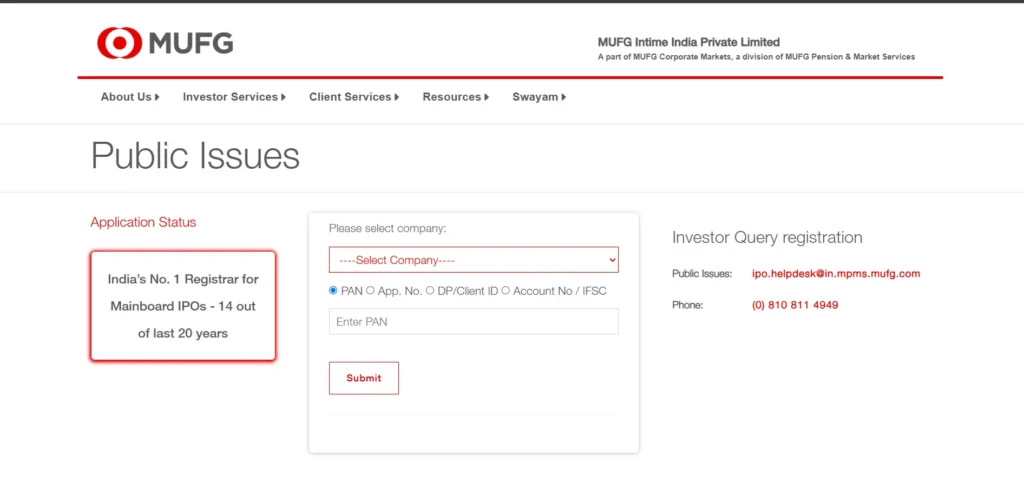
Checking by PAN Number
The fastest and most reliable way to check your Link Intime IPO allotment status is by PAN. Since your PAN is linked to only one demat account (or, at most, a small number under family applications), it eliminates ambiguity that can arise from typos in application numbers.
To check by PAN: select your IPO from the dropdown, choose the “PAN” option instead of Application Number or DP-Client ID, enter your 10-character PAN exactly as printed on your card (all capital letters, no spaces), complete the captcha, and submit. This method works even if you’ve forgotten your application number — a common problem for investors who applied through a bank’s net banking ASBA facility rather than a broker app, since bank-generated application numbers aren’t always saved automatically. If your PAN was used correctly at the time of application, this method should return your status without any additional steps.
What to Do If Status Shows “No Record Found” or “Data Not Available”
It’s common to see an error message on your first attempt. Here’s how to resolve the most frequent issues on the Link Intime portal specifically:
- Wrong IPO selected: Link Intime’s dropdown lists every IPO it has registered for, and selecting the wrong company or wrong listing date is the single most common cause of a “no record found” result. Double-check the exact company name and issue year.
- PAN entered incorrectly: Confirm there are no extra spaces or lowercase letters. The field is case-sensitive on some browsers.
- Application number format mismatch: Bank-applied (ASBA) application numbers often have a different digit count than broker-app application numbers. If one method fails, switch to PAN or DP-Client ID instead.
- Allotment not yet finalized: Link Intime typically uploads allotment data on the portal within 24-48 hours of the finalization date announced in the IPO’s official timeline. If you’re checking too early, the message may simply mean data hasn’t been published yet — try again the next business day.
- Application not processed by the registrar: In rare cases, applications rejected at the bank or broker level (due to incomplete UPI mandate approval, for instance) never reach the registrar and won’t appear in any search. Check your broker app or bank statement to confirm the application was successfully processed.
Link Intime vs Other Registrars — Which IPOs Use Link Intime?
Not every IPO uses Link Intime. Registrars are appointed on a per-issue basis, so it’s worth confirming which one is handling your specific IPO before you search. The other major registrars active in the Indian IPO market include KFin Technologies (KFintech) and Bigshare Services, each with their own dedicated status-check portals and lookup formats. If your IPO isn’t listed on the Link Intime dropdown, it’s likely being handled by one of these instead — check the official IPO prospectus or your application confirmation email, which always names the registrar.
How do I check my Link Intime IPO allotment status?
What is the Link Intime allotment status portal link?
Can I check Link Intime allotment without an application number?
How long does Link Intime take to update allotment status?

Mayank Srivastava is a Indian Stock Market Expert with over 2+ years of experience in financial markets and investment analysis. He specializes in IPO evaluations, grey market premium tracking,various stock market strategies, derivatives strategies and data-driven investment research.
His analysis has helped thousands of retail investors make informed decisions in the Indian primary market. Mayank holds advanced certifications in financial Market and regularly contributes to leading financial publications. But he is not SEBI registered Finance Professional. He writes only for educational purpose not giving any investment advice. Please Consult SEBI Registered Finance Consultant or Professional before any investment in stock market. He is not responsible any investment loss after reading this website content